Why AI Forgets Everything?
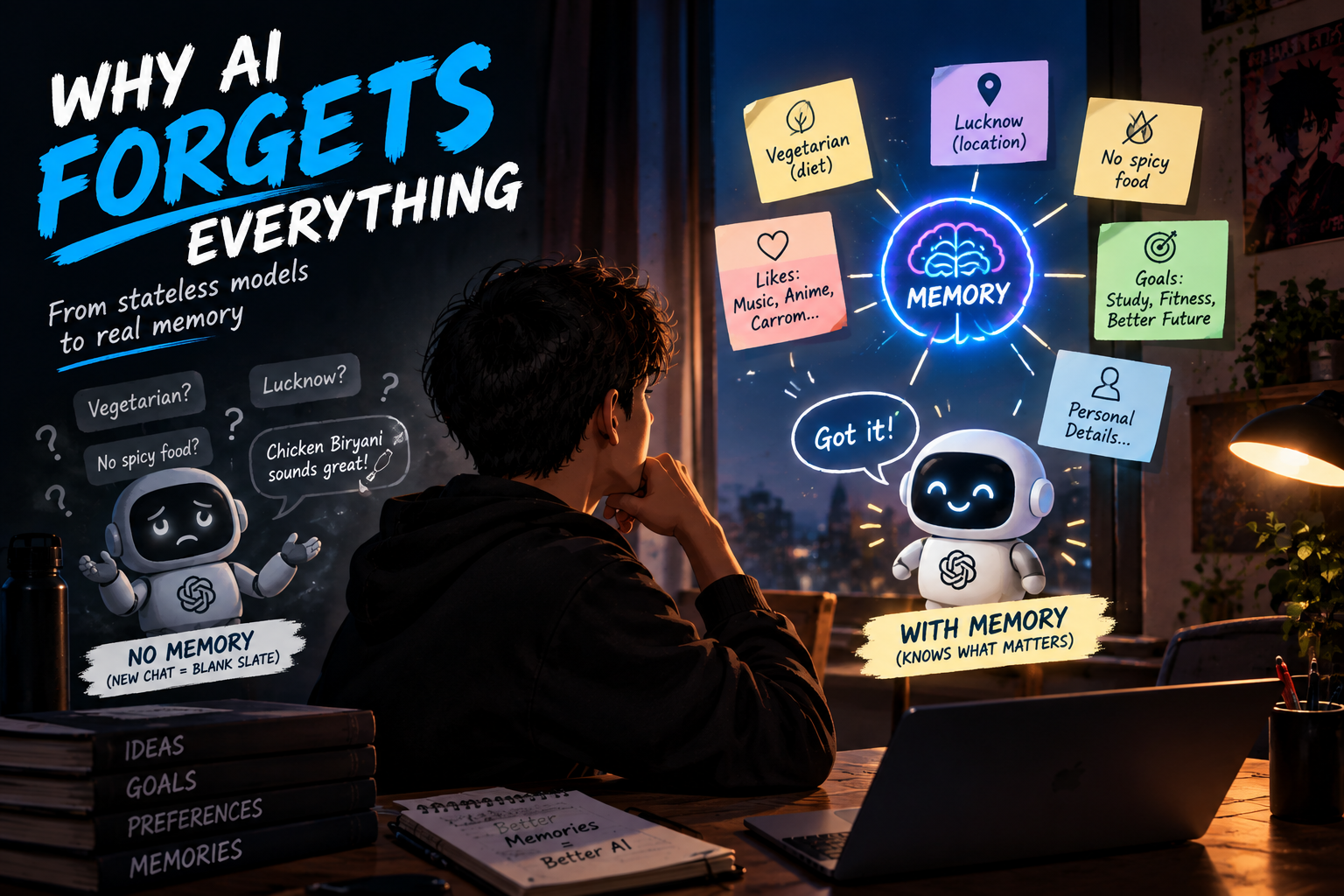
You told your AI you're vegetarian yesterday. Today it suggested chicken biryani. Why? 🍗
Yesterday you spent ten minutes telling an AI assistant about yourself. You're vegetarian, you live in Lucknow, and you hate spicy food. Today you open a new chat and ask, "What should I cook tonight?" It happily suggests a butter chicken recipe with extra chilli.
Did it ignore you? No. It simply never remembered you. Today we'll trace why that happens, starting from the basic fact that LLMs forget everything, all the way up to memory systems like Mem0 and Knowledge Graphs that let agents remember what matters.
Why LLMs Are Stateless
An LLM has no diary
An LLM is a function. You give it text, it gives you text back. Once the reply is generated, the model keeps nothing. No notes, no history, no "oh right, that's the user from yesterday".
This property is called being stateless: every call starts from a blank slate.
So how do chats feel continuous?
Here's the trick. When you chat with an AI app, the app quietly sends the entire conversation so far along with your new message, every single time.
Message 1:  [Hi, I'm vegetarian]                              → reply 1
Message 2:  [Hi, I'm vegetarian] [reply 1] [what to cook?]    → reply 2
Message 3:  [Hi...] [reply 1] [what to cook?] [reply 2] [...] → reply 3
The model isn't remembering. It's re-reading the whole transcript each time, like a person who gets handed the full chat log before every reply.
What happens when the chat ends?
A new conversation means a new, empty transcript. Everything from the old one is gone, unless something outside the model saved it.
Chat 1:  "I'm vegetarian."   →  ✅ the model knows (it's in the transcript)
Chat 2:  "What should I cook?" →  ❌ the model has never heard of you
Why this is a real problem for agents
A chatbot forgetting your name is a small annoyance. An agent forgetting is a bigger problem. A support agent that doesn't remember your last three complaints, or a coding agent that forgets your project's conventions every morning, makes you repeat yourself forever.
To fix this, we need to give the system something the model doesn't have: memory.
What AI Memory Means
Memory lives outside the model
Let's clear up a common confusion. When we say an AI agent has memory, the model's weights are not changing. The model itself is still stateless.
AI memory is a system around the model that stores information from interactions, and retrieves the right pieces later, so they can be placed in front of the model when needed.
The basic flow
User ──▶ Agent ──▶ Memory (search for relevant things)
                      │
                      ▼
User ◀── Agent ◀── relevant memories added to the prompt
The user sends a message
The agent looks in memory for anything relevant
Relevant memories get added to the prompt
The model replies, now knowing what it needs to know
New information from the conversation gets saved back into memory
An analogy: the doctor's file
Imagine a doctor who sees thousands of patients. They don't remember everyone. But before you walk in, the receptionist hands them your file: allergies, past visits, current medicines. The doctor reads the relevant parts, and suddenly seems to "know" you.
The doctor is the LLM. The file is the memory. The receptionist is the memory system, deciding what goes in front of the doctor.
What good memory is not
Memory is not "save every word forever". That's just a pile of logs. Good memory is selective. It saves what's useful, organizes it, and brings back only what matters for the current moment.
Short-Term Memory vs Long-Term Memory
Short-term memory
Short-term memory is what the agent holds during the current conversation or task. The messages so far, the tool results it just received, and the plan it's working through.
Lives inside the current context
Disappears when the session ends
Great for staying coherent within one task
Long-term memory
Long-term memory is information saved so it survives across sessions. Your dietary preference, your project's coding style, the issue you reported last week.
Stored outside the model, in a database
Persists after the chat ends
Retrieved when relevant, not all at once
The human parallel
When someone gives you a phone number and you repeat it in your head until you dial it, that's short-term memory. Your own birthday, or your best friend's name, that's long-term memory.
┌───────────────────────────┐        ┌───────────────────────────────┐
│    SHORT-TERM MEMORY      │        │      LONG-TERM MEMORY         │
│                           │        │                               │
│  Current conversation     │        │  Facts about the user         │
│  Recent tool results      │  save  │  Past events and outcomes     │
│  The plan in progress     │ ─────▶ │  Preferences and rules        │
│                           │        │                               │
│  Gone when session ends   │        │  Survives across sessions     │
└───────────────────────────┘        └───────────────────────────────┘
Quick comparison
| Short-Term Memory | Long-Term Memory | |
|---|---|---|
| Lifespan | One session or task | Across sessions, days, months |
| Where it lives | In the current context | In an external store |
| Typical contents | Recent messages, tool outputs | Preferences, facts, past events |
| How it's used | Always present | Retrieved when relevant |
| Main risk | Fills up the context | Becoming stale or wrong |
How they work together
During a conversation, the agent uses short-term memory to stay on track. At the end (or at key moments), the important bits get promoted into long-term memory. Next time, the relevant bits get pulled back into short-term memory. One feeds the other.
Episodic Memory for Past Experiences
What episodic memory is
Episodic memory stores specific events: things that happened, with their context. Think of it as the agent's diary of experiences.
In humans, it's "I remember the day I got lost in Delhi and a stranger helped me". It has a when, a where, and a what happened.
Examples for an agent
"On 3 Oct, the user asked to refund order ORD-1042, and the refund was approved."
"Last Tuesday, the deployment failed because the database migration ran before the build."
"The user tried the Mumbai flight search twice and wasn't happy with the prices."
Why episodic memory is useful
Because agents can learn from experience.
A customer support agent can say, "I see we dealt with a delayed delivery for you last month, I'm sorry this is happening again"
A coding agent can recall that a particular fix was tried before and failed, instead of suggesting it again
A research agent can remember which sources it already checked
What an episodic memory looks like
{
  "type": "episode",
  "when": "2026-09-24",
  "event": "User reported damaged order ORD-1042",
  "action_taken": "Refund of 2400 issued",
  "outcome": "User satisfied"
}
Notice that it records what happened, what was done, and how it went. That outcome part is gold, because it lets the agent do better next time.
Semantic Memory for Facts and Knowledge
What semantic memory is
Semantic memory stores facts and general knowledge, without the story of how you learned them. It's the "what is true" part of memory.
In humans, you know that Lucknow is the capital of Uttar Pradesh. You probably don't remember the exact day you learned it. That's semantic memory.
Examples for an agent
"The user is vegetarian."
"The user's name is Ved and they live in Lucknow."
"This project uses TypeScript and Drizzle for the database."
"The company's refund window is 7 days."
Episodic vs semantic: a simple way to tell
EPISODIC (an event, with context):
"On 3 Oct, the user complained that the biryani suggestion had chicken in it."

SEMANTIC (a distilled fact):
"The user is vegetarian."
Both come from the same conversation. The episode is the story. The fact is the lesson distilled from it.
Side by side
| Episodic Memory | Semantic Memory | |
|---|---|---|
| Stores | Specific events | Facts and knowledge |
| Answers | "What happened?" | "What is true?" |
| Has a time and place? | Yes | Usually not |
| Example | "Refund approved on 3 Oct" | "Refund window is 7 days" |
| Best for | Learning from past experience | Personalization and knowledge |
They work best together
Over time, many episodes can be boiled down into a single fact. After the user complains about meat three times, the agent doesn't need all three stories. It can store one semantic memory: "User is vegetarian." Good memory systems do this kind of consolidation.
How Memories Are Written, Updated and Forgotten
Memory is a lifecycle, not a dump
A memory system isn't just "save everything". Memories go through a lifecycle, just like notes in your own head.
Write ──▶ Update ──▶ Retrieve ──▶ Forget
  ▲                                  │
  └────── new info keeps coming ─────┘
Writing: deciding what to save
Not everything is worth remembering. "Hi, how are you?" isn't. "I'm allergic to peanuts" definitely is.
Usually an LLM is asked to extract the important facts from a conversation, and those get stored. A common choice is to write after each exchange, or when a session ends.
Conversation: "I just moved from Delhi to Lucknow, and I've gone vegetarian."

Extracted memories:
  → "Lives in Lucknow"
  → "Is vegetarian"
Updating: when facts change
People change. Yesterday's truth can be wrong today. If the memory says "lives in Delhi" and the user says "I moved to Lucknow", the system must update the old memory, not just add a contradicting one.
Before:  "Lives in Delhi"
New info: "I moved to Lucknow"
After:   "Lives in Lucknow"   (old fact replaced)
Without updating, memory becomes a pile of conflicting facts, and the agent gets confused about which one to trust.
Retrieving: finding the right memory
When a new message arrives, the system searches memory for what's relevant. This is often done with embeddings and semantic search, the same idea you may know from RAG. "What should I cook?" should pull up your dietary preference, even though the word "vegetarian" isn't in the question.
Forgetting: yes, on purpose
Forgetting is a feature, not a bug. A memory system should drop things that are:
Outdated: the user changed jobs, the old company is irrelevant now
Wrong: a fact that got corrected
Low value: trivia that never gets used
Requested for deletion: the user said "forget that"
Common ways to forget include deleting entries, letting rarely used ones expire after some time, or lowering their importance score so they stop showing up.
Why forgetting matters
Without it, memory grows forever, retrieval gets noisier, and old wrong facts keep sneaking into answers. A good memory is as much about what it lets go as what it keeps.
Why Memory Is Different from the Context Window
The tempting shortcut
You might think, "Context windows are huge now. Why not just stuff the entire history of every conversation into the prompt?"
It sounds simple, but it falls apart quickly.
The context window is working space, not storage
The context window is what the model can see right now, in this one call. It's like the desk in front of you. Memory is the filing cabinet in the next room.
         ┌─────────────────────────────┐
         │      CONTEXT WINDOW         │   ← what the model sees now
         │   (the desk, limited space) │
         └──────────────▲──────────────┘
                        │ pull only what's needed
         ┌──────────────┴──────────────┐
         │       MEMORY STORE          │   ← everything saved
         │   (the filing cabinet)      │
         └─────────────────────────────┘
Why not just use a giant context?
It resets. The context window is empty at the start of each new session. It doesn't persist by itself.
It's costly. More tokens in means more money and more waiting, on every single call.
It gets noisy. Burying the relevant fact under months of chat makes it easier for the model to miss or mix things up, just like the "breakfast on the 142nd day" problem from RAG.
It has no structure. A raw transcript doesn't know which facts are current, which were corrected, or which matter.
Side by side
| Context Window | Memory | |
|---|---|---|
| What it is | What the model sees right now | Saved information outside the model |
| Persists across sessions? | No | Yes |
| Size | Limited | Can grow large |
| Cost per call | Grows with every token | Only retrieved pieces are paid for |
| Organized? | A raw transcript | Extracted, updated, and searchable |
They work as a team
Memory doesn't replace the context window. It feeds it. The memory system decides which few relevant pieces deserve a spot on the desk for this particular question.
Mem0 as a Memory System
What Mem0 is
Mem0 (pronounced "mem-zero") is an open-source memory layer for AI agents. Instead of building the whole write, update, retrieve, and forget pipeline yourself, Mem0 handles it behind a simple interface.
It's also available as a managed platform, if you don't want to run the infrastructure yourself.
What it does for you
When you give Mem0 a conversation, it uses an LLM to extract the relevant facts and preferences, and stores them in its data stores (a vector database for semantic search, plus an entity graph, which we'll meet next). On later searches, it finds the memories that match.
Memories can be tied to a user, an agent, or a session, so one person's memories don't leak into another's.
A tiny example
npm install mem0ai
import { Memory } from "mem0ai/oss";

const memory = new Memory(); // by default uses OpenAI, so set OPENAI_API_KEY first

// WRITE: save memories from a conversation
const messages = [
  { role: "user", content: "Hi, I'm Ved. I'm vegetarian and I live in Lucknow." },
  { role: "assistant", content: "Nice to meet you, Ved! I'll remember that." },
];
await memory.add(messages, { userId: "ved" });

// RETRIEVE: find relevant memories later, even in a brand new session
const results = await memory.search("What should I cook tonight?", {
  filters: { userId: "ved" },
});
console.log(results);
Here we import from mem0ai/oss, the open-source version that runs inside your own app. The managed platform has its own client that uses an API key instead.
The search returns something like:
{
  "results": [
    {
      "memory": "Is vegetarian",
      "userId": "ved",
      "score": 0.87
    }
  ]
}
Notice that the question never said "vegetarian", but the right memory came back anyway. That's semantic search doing its job.
Using it inside an agent
The pattern is simple: search memory first, add the results to the prompt, then save the new conversation afterwards.
async function chat(userMessage: string, userId: string) {
  // 1. Retrieve relevant memories
  const found = await memory.search(userMessage, { filters: { userId } });
  const memories = found.results.map((r) => r.memory).join("\n");

  // 2. Add them to the prompt
  const prompt = `What you know about this user:\n${memories}\n\nUser: ${userMessage}`;
  const reply = await callYourLLM(prompt); // any LLM call

  // 3. Save the new exchange back to memory
  await memory.add(
    [
      { role: "user", content: userMessage },
      { role: "assistant", content: reply },
    ],
    { userId }
  );

  return reply;
}
Update and delete are built in
Mem0 can also update and delete individual memories, and it decides on its own when new information should change an old memory instead of creating a duplicate. That covers the lifecycle we discussed earlier.
await memory.update("memory-id", "Lives in Lucknow");
await memory.delete("memory-id");
await memory.deleteAll({ userId: "ved" }); // wipe one user's memories
A small tip
Mem0's API changes between versions, and its TypeScript examples aren't always consistent (for example, whether filters use userId or user_id). Check the official docs at docs.mem0.ai for the version you install, and console.log your search results once to see the exact shape you get back.
Knowledge Graphs for Storing Connected Memories
The problem with flat memories
A list of facts like "Ved works at Acme", "Priya is Ved's manager", and "Acme is in Lucknow" are stored separately. But the connections between them are what give them meaning. If you ask, "Who is Ved's manager, and where do they work?", the agent has to piece it together from three loose notes.
What a knowledge graph is
A knowledge graph stores information as entities (things) connected by relationships. Entities are the dots, relationships are the lines between them.
        works_at                     located_in
Ved ──────────────▶ Acme Corp ──────────────▶ Lucknow
 │                       ▲
 │ reports_to            │ works_at
 ▼                       │
Priya ───────────────────┘
Each connection is typically stored as a triple: subject, relationship, object. For example, (Ved, works_at, Acme Corp).
Why graphs are great for memory
They capture relationships. "Priya is Ved's manager" is a first-class fact, not buried in a sentence.
They support multi-hop questions. "Which city does my manager work in?" means following lines: Ved → Priya → Acme → Lucknow.
They stay organized. Entities are linked, so the same person isn't stored in five different phrasings.
They're explainable. You can see exactly why the agent believes something.
Vector memory vs graph memory
| Vector (Semantic Search) Memory | Knowledge Graph Memory | |
|---|---|---|
| Stores | Text chunks as embeddings | Entities and relationships |
| Great at | "Find things similar in meaning" | "How are these things connected?" |
| Question style | "What does the user like?" | "Who works with whom?" |
| Weakness | Loses links between facts | Needs entity extraction to build |
The best of both
Neither one is "better". Vector search is great at fuzzy recall, and graphs are great at structured connections. Together they cover both.
How Mem0 uses graphs
On the managed Mem0 Platform, Mem0 builds its own entity graph from your memories, with nothing extra to set up. Each time you add a memory, it extracts the entities mentioned (people, places, organizations, concepts) and links together every memory that mentions the same entity. At search time, it spots the entities in your question and boosts the memories connected to them, on top of normal semantic search.
import MemoryClient from "mem0ai";

const client = new MemoryClient({ apiKey: process.env.MEM0_API_KEY! });

await client.add(
  [{ role: "user", content: "I work at Acme Corp with Alice on the Q1 roadmap" }],
  { userId: "jordan" }
);

// Entities from the question are matched against the graph,
// so related memories get a ranking boost
const results = await client.search("Who does Jordan work with?", {
  filters: { user_id: "jordan" },
});
The code looks like normal add and search calls. The graph works quietly behind the scenes.
One honest caveat: this is a lighter idea than a classic knowledge graph. Mem0's graph links memories through shared entities, but it doesn't store typed relationships like "Priya manages Ved". If you need explicit relationships and multi-hop queries over them, you'd run a graph database such as Neo4j yourself. Older versions of Mem0 also connected to external graph stores, but the platform has since moved to the built-in approach.
Putting it all together
                 ┌──────────────────────────────┐
User message ──▶ │          AI Agent            │ ──▶ Response
                 └──────┬───────────────▲───────┘
                  search│               │relevant memories
                        ▼               │
                 ┌──────────────────────┴───────┐
                 │            Mem0              │
                 │  ┌────────────┐ ┌──────────┐ │
                 │  │ Vector DB  │ │ Knowledge│ │
                 │  │ (meaning)  │ │  Graph   │ │
                 │  │            │ │ (entities)│ │
                 │  └────────────┘ └──────────┘ │
                 └──────────────────────────────┘
How Memory Makes AI Agents More Useful
From a stranger to an assistant
Without memory, every conversation starts with an agent that knows nothing about you. With memory, it picks up where you left off.
Personalization
The agent knows your preferences and style, so you don't re-explain yourself. Your cooking agent stops suggesting chicken. Your writing assistant keeps your tone. Your coding agent follows your project's conventions without being told each morning.
Continuity across sessions
Long tasks rarely finish in one sitting. With memory, an agent can say, "Last time we got halfway through the migration, here's what's left." That's the difference between a tool and a collaborator.
Learning from experience
With episodic memory, agents can avoid repeating mistakes. If a fix failed last week, the agent knows not to suggest it again. If a certain approach pleased the user, it can lean on it.
Less repeated context
Instead of re-sending the same background information in every prompt, the agent retrieves just the relevant pieces. That saves tokens, cost, and time, and keeps the prompt cleaner.
A before and after
WITHOUT MEMORY
User: "Suggest dinner."
Agent: "How about butter chicken?"
User: "I'm vegetarian! I told you!" 😤

WITH MEMORY
User: "Suggest dinner."
Agent: "Since you're vegetarian and don't love spice, how about
        a mild paneer curry with rice? 🍛"
Same model, same question. The only difference is that one of them remembers.
What an AI Agent Should and Should Not Remember
More memory is not always better
Once agents can remember, a new question appears: should they? Remembering the wrong things can be creepy, risky, or just plain wrong. This is where good judgment matters.
What agents should remember
Stable preferences: dietary needs, language, tone, tools the user likes
Useful context: the user's role, ongoing projects, goals
Corrections: "Please don't call me sir", so the agent doesn't repeat the mistake
Outcomes of past actions: what worked and what didn't
What agents should be careful with
Sensitive personal data: health details, financial info, government IDs, passwords
Private details about other people: a user's friend or colleague didn't agree to be remembered
One-off or temporary things: "I'm tired today" shouldn't become a permanent trait
Guesses: an inference like "probably single" should never be stored as a fact
Principles for responsible memory
Transparency: users should be able to see what the agent remembers
Control: users should be able to edit or delete memories, and turn memory off
Consent: be upfront about what is being saved and why
Isolation: one user's memories must never leak into another's, which is why the
user_idmattersExpiry: keep memories only as long as they're useful
Security: a memory store holds personal data, so protect it like any other database
A useful test
Before saving something, ask: "Would the user be comfortable if they saw this stored, and would remembering it actually help them?" If the answer to either is no, don't save it 🙂
A note on wrong memories
Memories can be mistaken. The model might extract the wrong fact, or a fact might go stale. Treat memory as helpful context, not unquestionable truth, and let the user's current message win when they conflict.
Quick Recap
LLMs are stateless. Chats feel continuous only because the whole transcript is re-sent every time, and a new session starts empty.
AI memory is a system around the model that stores information and retrieves the relevant parts later. The model itself doesn't change.
Short-term memory covers the current session. Long-term memory persists across sessions.
Episodic memory stores events and outcomes. Semantic memory stores facts. Many episodes can be distilled into one fact.
Memories have a lifecycle: write, update, retrieve, and forget. Forgetting keeps memory accurate and useful.
Memory is not the context window. The context is the desk, memory is the filing cabinet, and memory feeds only the relevant pieces to the desk.
Mem0 is a memory layer that extracts, stores, searches, updates, and deletes memories for you.
Knowledge graphs store entities and their relationships, which helps with connected, multi-hop questions. Vector and graph memory work best together.
Memory makes agents personal, continuous, and better over time, but they should remember carefully, transparently, and with user control.
A model without memory answers the question. An agent with memory remembers who's asking. The skill isn't remembering everything, it's remembering the right things, and forgetting the rest.