Git Basics & Common Terminologies
What is Git?
Git is a VCS (Version Control System) that helps you and other developers track changes made in the code files. Linus Torvalds (Founder of Linux) was working on the Linux but as the code grown it became hard to manage and track it so, he developed Git to track the code.
Why to use Git?
Git is not the only VCS but why we still use it? The reason is simple Git’s features make it better some of them are listed below:
Git has distributed architecture.
This make it faster and efficient.
Robust branching and merging capabilities.
Resilient workflow that enables Offline Work.
Git is so popular in Industries making it a Industry-grade VCS.
Git is very easy to use.
Common Git Terms:
Repository (Repo):
The storage space that contains all of your files.
Staging Area:
An intermediate position where you review all the code before commiting it. It is like the backstage.
Commit:
Commit can be referred as a checkpoint, it saves the changes at that specific time. It takes a message as the input so that it becomes easier for tracking code.
Branch:
Branch is like a college you might have seen some colleges having different branches like IIT mumbai, IIT delhi etc. afterall, They all are IIT but they are different branches of IIT right?
Branch is also the same it is just a piece of code which runs parallelly to the original code after a user defined commit which can meet it again after a user defined commit.
Head:
After each and every commit there is a term named head that changes to the latest commit it tells us about what is the latest commit and it contains reference of its parent commit (previous commit).
Hash:
Unique id of each commit.
Basic Git Commands:
git —version:
Specifies the version of git installed in your system.
git --version
git init:
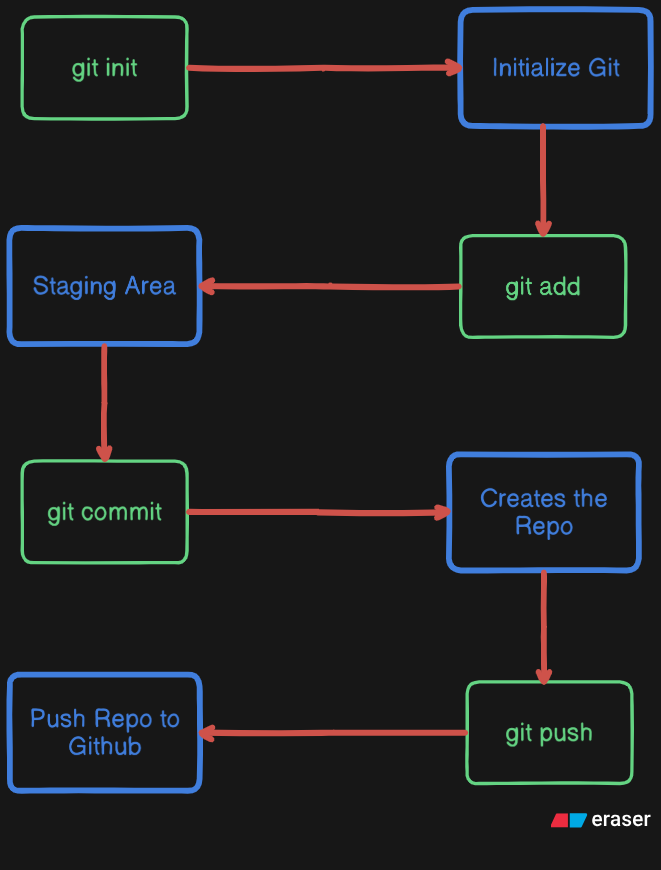
This command initializes the git repo in your working directory.
git init
git status:
This command tells us about the status of the repo like is there git initialized or not? How many files are in staging area? how many files are not in staging area? etc.
git status
git add <filename>:
Pushes the specified file to the Staging Area.
git add index.html
git add . #adds all the files in the working directory to the staging area
git commit -m <“Message“>:
Commits all the files which were already in staging area.
git commit -m "Hello This is my first commit"
git commit -am "Second commit" #Adds all the files which were atleast, once added to the staging area to the staging area and commits them instantly.
git log:
Gives the list of all the commits along with their authors, messages and hash.
git log
git log --oneline # Gives back the data in short form
Below diagram will help you understand the workfllow: