
Git Insights: How Git Actually Works?
What is .git/ ?
When you run the command git init a hidden git folder is initialized in your working directory. The folder’s name is .git. This folder is hidden by default in VS Code but you can see it via settings or see it’s inner content using the linux commands but, let me tell you that you should not be interfering with the .git/ because neither it is recommended nor it is a good practice because it can ruin your whole work.
What does .git/ contain?
This .git/ contains a lot of more files and folders each having their own importance that we have studied in the blog itself below.
The .git/ includes files/folders like:
COMMIT_EDITMSG
Config
description
FETCH_HEAD
HEAD
hooks
index
info
logs
objects
ORIG_HEAD
refs
The below diagram is a pictorial representation of this whole lecture:
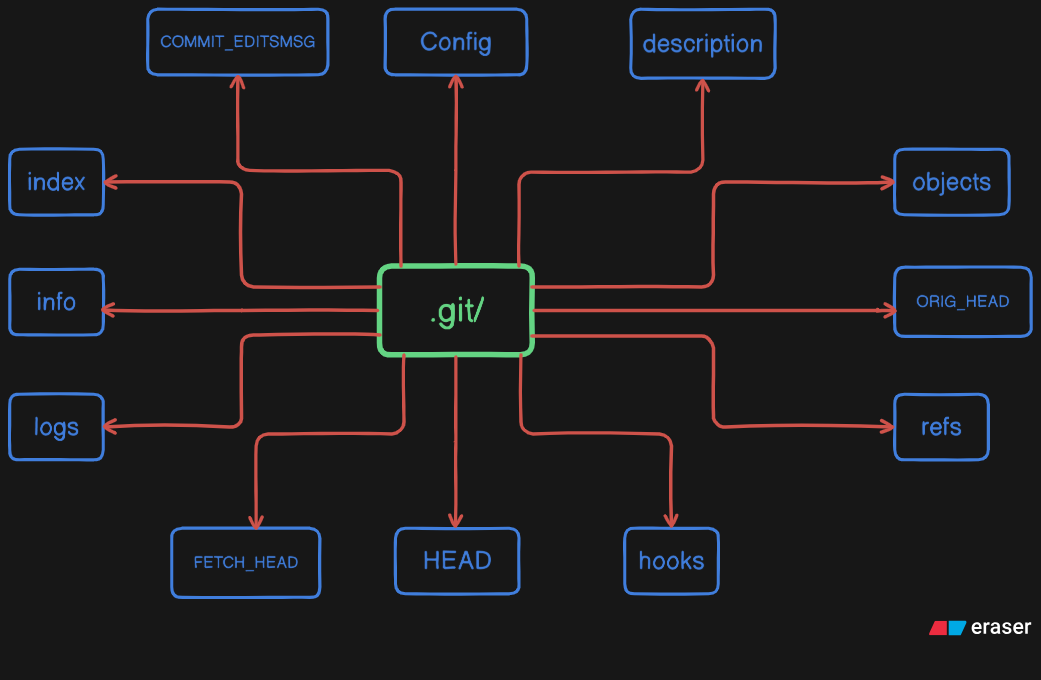
Git insides:
Each and every file/folder present in the .git/ does some job that makes the command run successfully!
Importance of all core file/ folder:
HEAD:
This HEAD file contains the name of the current branch you are working in.
index:
This file is the staging area this file contains all the name of all the files which are not commited but pushed to the staging area using the command git add.
config:
This files contains all the data about the configuration for your repo. This files contains the information about the Name of author, Author’s email, Branch tracking settings, remote origins.
description:
Simple text file contains the description of your repo.
objects/:
Stores all of your repo’s data. It works as the database for your repo. It contains 3 main object types:
Blobs: Stores actual content of the files.
Trees: Stores the repo structure, the file names, pointer to blobs and other trees.
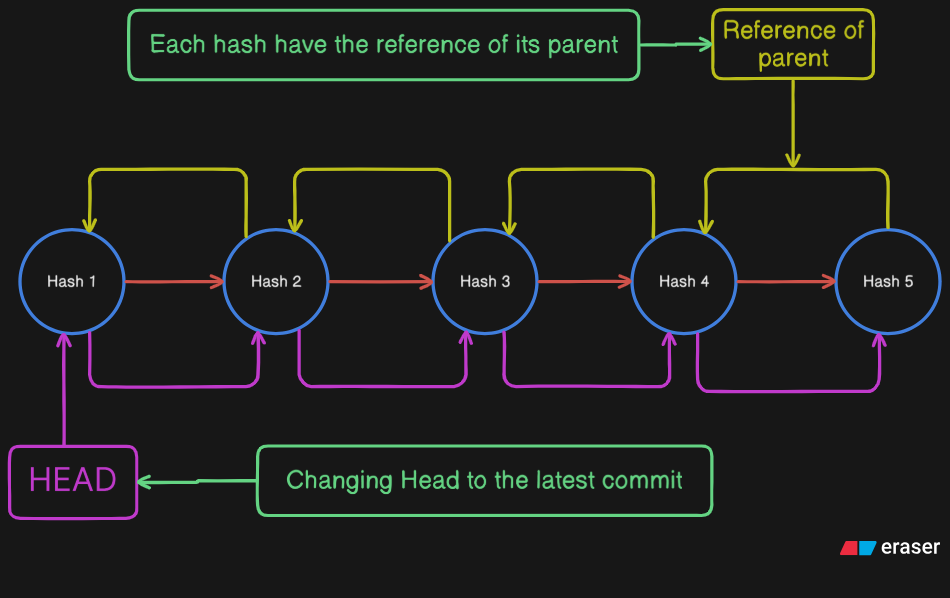
Commits: Stores the metadata like author name and email, date of commit, commit message, pointer to the top level of the tree and reference to parent commit.
refs/:
This folders stores references to commit objects. It contains subdirectories for:
heads/: Stores the SHA-1 hashes of lateset commit.
tags/: Stores references to specific commits that have been tagged.
remotes/: Store references for your branches.
hooks/:
This folder contains sample scripts that can be enabled and configured to run automatically before or after certain Git events like committing, pushing, or receiving updates.
info/:
This folder contains extra information for the repository, like exclude file, which is a local, private version of a .gitignore file.
logs/:
This folder maintains a history of references in your repo, This allows you to undo the commits, back operations, recover lost commits.
How these files/folders work together to perform basic functions?
How Branch System Works?
The remotes/ in the refs/ helps us to create, update, delete, change the current branches.
The HEAD contains the ref to the current branch.
How Logs & Diff Work?
The Branch System works and finds the current branch.
Then, it goes into the objects/ and gives you back the collected data.
When you provide the 2 hashes for git diff it goes ahead search uniquely for those and reads them, spots the difference and finally comes back to you.
How Staging Area Works?
When you run the command git add, Git adds all the specified files to the index
When you commit them it goes and commits all the files whose ref was there in index.
How Commit Works?
Git creates tree objects that represent directory structure.
It writes a commit object that points to the top level of the tree.
Importance of .git/:
The .git/ is the most important thing in the Git like Git can’t do anything without .git/. So, I hope this blog had gave you enough of the idea that how git actually processes the commands from insides and how important are the subdirectories in the .git/ are…


