

CSS Selectors: Targeting Elements With Precision
Why CSS Selectors are Needed?
We need CSS Selectors because they are a way to pick the correct element for styling. There are many ways to use CSS Selectors, The most common and basic ones are covered in this blog.
Universal Selector
Intro: Universal Selector is one of the most used selector.
Syntax: The targeting looks like
*.Styling: All the elements of the documents get styled.
Analogy: you are targeting all of World’s people for some work.
Example: If you have to all the elements, you can use it like:
* {
    /* all styles can go here */
}
Element Selector
Intro: Element Selector is the most basic way to target an element.
Syntax: The targeting looks like
tagname.Styling: All the elements matching the tag will get styled.
Analogy: you are targeting all of India’s people for some work.
Example: If you have to target the
buttons, you can use it like:
button {
    /* all styles can go here */
}
Class Selector
Intro: Class Selector is one of the most used way to target an element.
Syntax: Here, the targeting looks like
.class.Styling: All the elements matching the class will get styled.
Analogy: Now, in India you are targeting those who are 25+.
Example: If you have to target the buttons of class
red-btn, you can use it like:
.red-btn {
    /* all styles can go here */
}
ID Selector
Intro: ID Selector is pretty different than the other two.
Syntax: Here, the targeting looks like
#id.Styling: As you know that the ID is always unique so the styling is applied to just one element.
Analogy: Now, among all the 25+ you are targeting a specific person like you have grabbed his collar.
Example: If you have to target the button of ID
blue-btn, you can use it like:
#blue-btn {
    /* all styles can go here */
}
Group Selector
Intro: Group Selector helps you to target multiple elements at once.
Syntax: Here, the targeting looks like
first, second, third….Styling: Here the styling is applied to all you have selected they can be ID or class or tag or even all together.
Analogy: Now, you are not here for same people or just one person you are here for multiple people.
Example: If you have to target the
paragraph, button of IDblue-btn, and div of classblue-div, you can use it like:
p, .blue-div, #blue-btn {
    /* all styles can go here */
}
Child Selector
Intro: Child Selector helps you to target the direct child of an element.
Syntax: Here, the targeting looks like
parent-name > child-name.Styling: Here the styling is applied to the selected child which can be a class, or a tag, or an ID.
Analogy: Now, you are targeting everyone who is child of a specific person.
Example: If you have to target a
paragraphwhich is a child of a div with IDcontainer, you can use it like:
#container > p {
    /* all styles can go here */
}
Descendant Selector
Intro: Descendant Selector helps you to target the descendants of an element (children, grandchildren, great-grandchildren, and further).
Syntax: Here, the targeting looks like
ancestor-name descendant-name.Styling: Here the styling is applied to the selected descendant which can be a class, or a tag, or an ID.
Analogy: Now, you are targeting everyone who belongs to a specific family.
Example: If you have to target a
paragraphwhich is a descendant of a div with IDcontainer, you can use it like:
#container p {
    /* all styles can go here */
}
CSS Specificity
Now, since we have talked about all the basic selectors let’s talk about the specificity of the CSS Selectors.
CSS Specificity defines that which selector holds how much value.
Let’s have an element with both and ID and a class.
<div class="green-div" id="red-div">...</div>
Here we got that now what will happen if we apply CSS to both class and ID.
.green-div {
    background-color: green;
}

.red-div {
    background-color: red;
}
Now tell me one thing which CSS will get applied for that look at the chart given below to understand the specificity value.
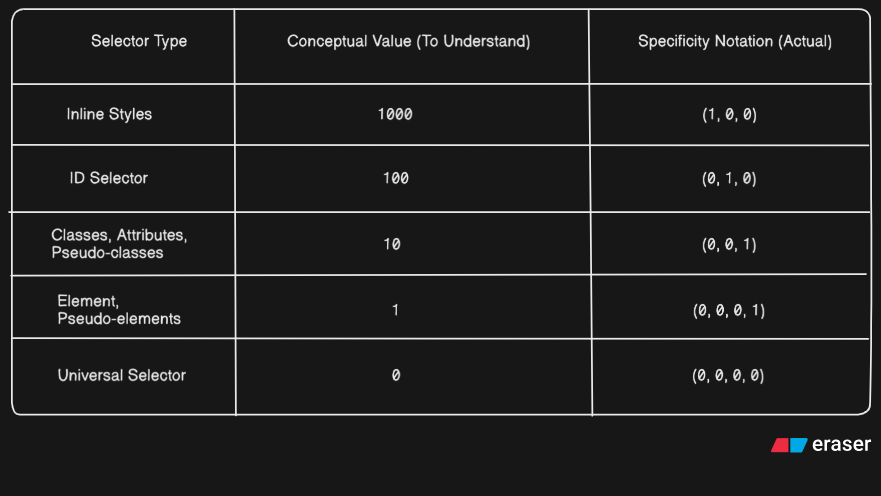
By analyzing this whole table you’ll be capable of answering the question and yes, you guessed it right the ID selector’s CSS will work here because it has more specificity value.
But there is a catch that is:
.green-div {
    background-color: green;
}

.green-div {
    background-color: lime;
}
What will happen in this situation? The answer is when 2 selectors of the same specificity value are used the one who is applied later overwrites the value because think about it you first painted your wall green and then lime which color will appear lime right? That’s it that’s all about the CSS Specificity.


